
Download Data Guardian – Secure Database Creator & Password Manager
Overview
In a world where personal and professional data is constantly under threat, Data Guardian offers a compelling blend of security and flexibility. Unlike many competitors that rely on standard 128‑bit encryption, Data Guardian pushes the envelope with a robust 448‑bit Blowfish encryption engine. This level of protection makes it virtually impenetrable for all but the most determined attackers.
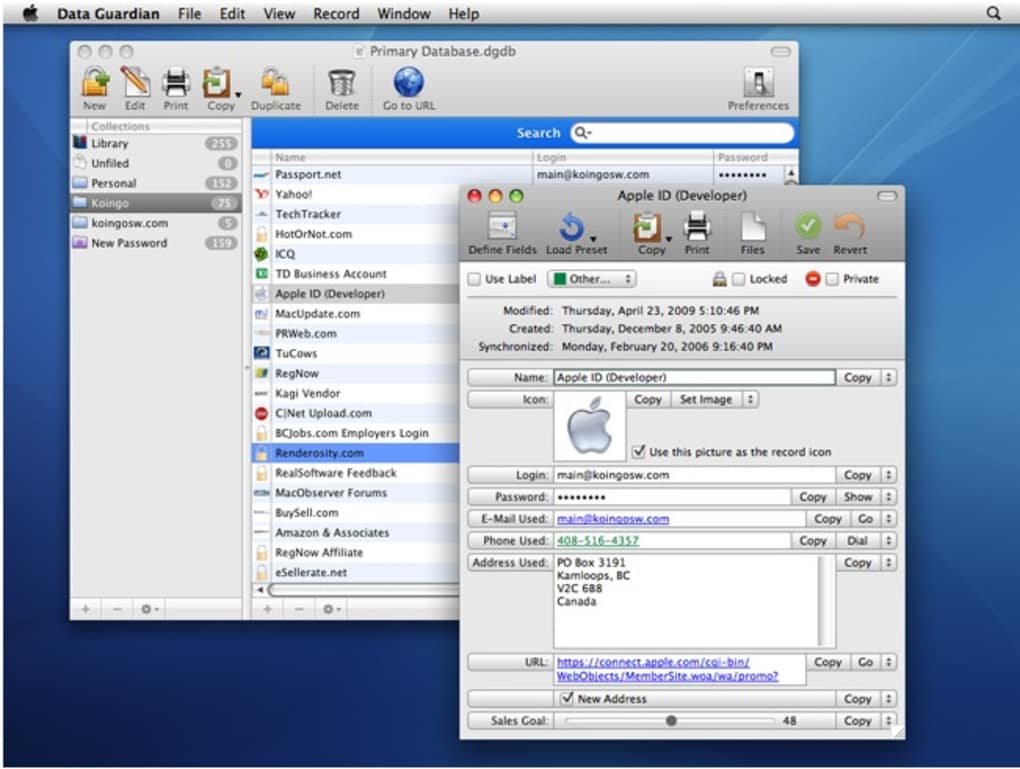
The software lets you build multiple, fully‑customizable databases—whether you need an address book, a customer ledger, a private journal, a password vault, or even a simple notepad. Each database benefits from the same high‑grade encryption, so you can store sensitive information locally or in the cloud without worrying about unauthorized access. The program also integrates seamlessly with your operating system’s native Keychain, enabling one‑click autofill for passwords across supported applications.
While browsers like Firefox and Internet Explorer have built‑in password managers, Data Guardian’s encrypted Keychain adds an extra layer of protection that many users find reassuring. Additional shortcuts—such as auto‑recognition of phone numbers for one‑click calling, email address detection for instant email composition, and on‑the‑fly secure password generation—turn this tool into a true productivity enhancer. Although it may not match the speed of market leaders like 1Password, Data Guardian’s emphasis on deep encryption and extensive customization makes it a solid choice for anyone serious about data privacy.
Key Features & Benefits
- 448‑bit Blowfish Encryption: Provides industry‑leading protection far beyond typical 128‑bit standards.
- Multiple Custom Databases: Create as many databases as you need—address books, client lists, journals, password vaults, or simple notes.
- Full Customization: Assign categories, colors, and tags to each entry for instant visual organization.
- Keychain Integration: Auto‑fill passwords securely across macOS, Windows, Android, and iOS platforms.
- One‑Click Actions: Detect phone numbers and email addresses to launch calls or compose emails instantly.
- Secure Password Generator: Produce random, high‑entropy passwords directly within the app.
- Cross‑Platform Support: Native clients for Windows, macOS, Android, and iOS ensure you stay protected on any device.
- Offline & Cloud Flexibility: Store databases locally or sync via encrypted cloud services for remote access.
- Export & Import Tools: Move data between devices or migrate from other password managers with ease.
- Regular Updates: Frequent security patches keep the encryption engine and compatibility current.
The feature set is designed with both power users and novices in mind. For businesses, the ability to create separate encrypted customer databases can replace multiple disparate tools, simplifying compliance and reducing overhead. Individual users benefit from a single, secure repository for all sensitive information, eliminating the need to remember dozens of passwords or keep scattered notes.
The built‑in shortcuts also shave minutes off daily workflows—recognizing a phone number in a note and dialing it with one click can be a game‑changer for sales reps and support staff. Moreover, the password generator adheres to best‑practice guidelines (minimum 16 characters, mixed case, symbols, and numbers), helping you avoid weak or reused credentials. In short, Data Guardian merges iron‑clad security with real‑world convenience, delivering a balanced solution for anyone who values privacy without sacrificing usability.
Installation, Usage & Compatibility
Getting started with Data Guardian is straightforward. After purchasing or selecting the free trial, download the installer appropriate for your operating system. The Windows installer is an executable (.exe) file, the macOS version is a signed .dmg package, and mobile users can retrieve the app from Google Play or the Apple App Store. Once downloaded, follow the on‑screen prompts:
- Run the installer and accept the license agreement.
- Choose an installation directory (the default works for most users).
- When prompted, create a master password. This password encrypts all your databases, so choose a strong, memorable phrase.
- After installation, launch Data Guardian and sign in with your master password.
- Use the “New Database” wizard to define the type (e.g., Password Manager, Address Book) and apply custom colors or tags.
The user interface is organized into a left‑hand navigation pane where each database appears as a collapsible entry. Clicking a database opens a grid view of its records, with options to add, edit, or delete entries. For password entries, a “Copy to Clipboard” button respects the 30‑second auto‑clear policy to prevent lingering secrets. The built‑in search bar filters results instantly, while the “Generate Password” tool can be invoked from any record view.
Data Guardian supports the following platforms:
- Windows 10, Windows 11 (64‑bit)
- macOS 10.15 Catalina and later (Intel & Apple Silicon)
- Android 8.0 Oreo and later
- iOS 13 and later (iPadOS included)
Compatibility extends to popular browsers via a lightweight extension that communicates with the desktop client. While the current version only offers basic autofill, future updates promise deeper integration with Chrome, Edge, and Safari. Users on corporate networks should note that Data Guardian can be configured to use a proxy or VPN, ensuring seamless operation behind firewalls. Regular updates are delivered automatically; a notification appears when a new version is ready, and a single click installs the patch without losing any data. For those who prefer manual control, the “Check for Updates” option in the Settings menu allows on‑demand verification.
Pros, Cons, Frequently Asked Questions & Review
Pros
- Industry‑leading 448‑bit encryption for unparalleled security.
- Highly customizable databases that adapt to any workflow.
- Native Keychain integration for secure autofill across devices.
- Cross‑platform availability (Windows, macOS, Android, iOS).
- One‑click shortcuts for phone numbers and email addresses boost productivity.
- Secure password generator meets modern complexity standards.
Cons
- Speed can be slower than premium competitors like 1Password.
- Browser integration is currently limited to basic autofill.
- Initial learning curve for users unfamiliar with custom database creation.
- No built‑in secure file sharing for collaborative teams (requires third‑party solutions).
Frequently Asked Questions
Is Data Guardian truly free?
Data Guardian offers a free tier with basic database creation and encryption. Advanced features like cloud sync, premium themes, and priority support require a paid subscription.
How does the 448‑bit Blowfish encryption differ from standard 128‑bit AES?
Blowfish with a 448‑bit key provides a larger key space, making brute‑force attacks exponentially more difficult. While AES‑128 is considered secure, Blowfish’s extended key length offers an extra margin of safety for highly sensitive data.
Can I import passwords from another manager?
Yes. Data Guardian includes an import wizard that supports CSV files from popular managers such as LastPass, KeePass, and 1Password. The data is re‑encrypted with your master password during the import process.
Is my master password stored anywhere?
No. The master password is never stored on disk or transmitted to servers. It is used locally to derive the encryption key that protects all databases.
What backup options are available?
You can export encrypted backups manually or enable automatic cloud sync with services like Dropbox, Google Drive, or OneDrive. All backups retain the 448‑bit encryption, ensuring they remain secure even if the cloud provider is compromised.
Review Summary: Data Guardian excels in encryption strength and customization, making it a top choice for privacy‑focused individuals and small businesses. The main drawbacks are its relative slowness and limited browser integration, which the developers have promised to address in upcoming releases.
Conclusion & Call to Action
If you prioritize iron‑clad security and need a versatile tool that can double as a password manager, note‑taking app, and customer database, Data Guardian delivers on all fronts. Its 448‑bit Blowfish encryption sets a new benchmark, while the ability to create themed, color‑coded databases provides unmatched flexibility. Although it may lag slightly behind premium competitors in speed and browser integration, the trade‑off is a level of data protection that few alternatives can match. For users who are willing to invest a few extra seconds for peace of mind, Data Guardian is a worthwhile addition to your digital toolbox.
Ready to safeguard your data? Download Data Guardian now and start building encrypted databases that keep your information out of the wrong hands. Take advantage of the free trial to explore its features before committing to a subscription—your data’s security is just a click away.







